Best Gaming Keyboard Under $100: The Corsair K70 CORE RGB Gets Mechanical Right
Most roundups bury this keyboard in a list of eight options. Here's why the K70 CORE RGB specifically earns the spot as the mechanical keyboard to buy if you're switching off membrane for the first time.

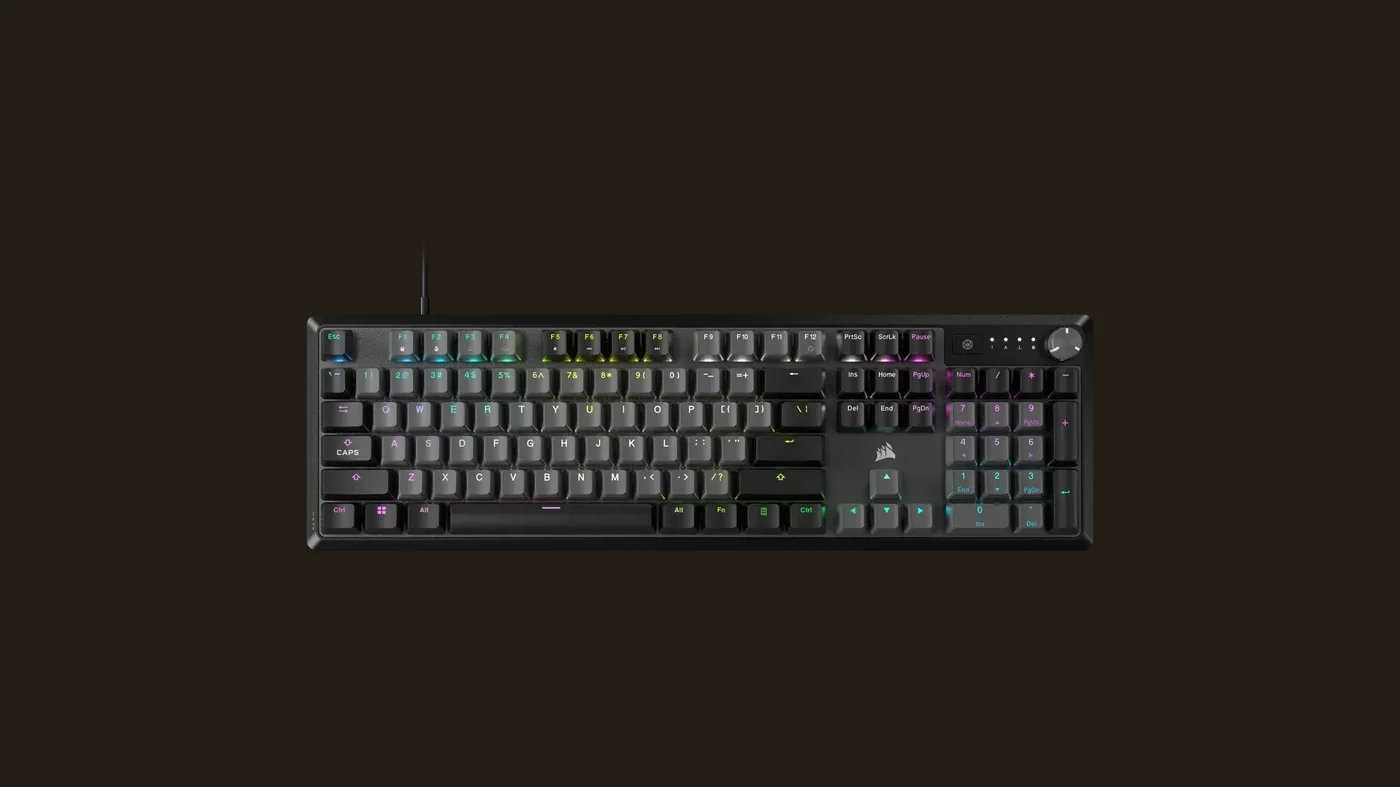
The best gaming keyboard under $100 right now is the Corsair K70 CORE RGB, and the reason isn't a flashy spec on paper — it's that Corsair pre-lubricates the switches at the factory instead of shipping the scratchy, inconsistent linear switches that usually define this price bracket. Pair that with a 1000Hz polling rate, full per-key RGB, and onboard memory for five profiles, and you get a keyboard that feels like a genuine upgrade rather than a budget compromise. It's full-size only and wired-only, so it won't suit a minimalist desk, but for the specific buyer this board is built for — someone making the jump from a membrane keyboard to their first mechanical board — it's the smartest pick in its price range.
The Essentials: Why This One, Not The Other Seven
Search "best gaming keyboard under $100" and you'll land almost entirely on roundup articles from sites like RTINGS, Tom's Hardware, and WePC, each listing eight to ten boards side by side — the Corsair K70 CORE RGB usually shows up somewhere in the middle of those lists, next to names like the AULA F75 Pro, Keychron V1 Max, and Redragon K552. What those lists rarely explain is why the K70 CORE specifically makes sense over the others for a very common buyer: someone who has only ever typed and gamed on a membrane keyboard and wants to try mechanical switches without feeling like they gambled on an unfamiliar brand.
That's where the CORSAIR MLX Red v2 switches matter more than the spec sheet suggests. These are linear switches — no tactile bump, no click — pre-lubricated at the factory. At this price point, that's not standard: plenty of $60-80 mechanical boards ship with dry, scratchy switches that feel noticeably rougher than what you'd expect from watching a mechanical keyboard review online, and only start feeling smooth after you lube them yourself, which is a real barrier for someone who has never opened a keyboard before. The K70 CORE skips that step entirely. Reported switch specs put actuation at 1.9mm with a 4mm total travel and roughly 50g of actuation force — light enough to feel fast, firm enough to avoid accidental presses for someone still building finger memory on a mechanical layout.
On top of the switches, the 1000Hz polling rate matters for anyone coming from a membrane board, where 125Hz or unspecified polling is common. That jump alone is a bigger practical upgrade for a first-time switcher than chasing an 8000Hz board meant for players who are already deep into competitive tuning — see our best gaming mouse 2026 review for where that kind of extreme polling actually starts to pay off, or our best gaming headset under $100 review if you're building out the rest of a budget peripheral setup at the same time. Once the input side is sorted, our best gaming monitor under $300 review covers the display half of the desk.
What Owners And Independent Testing Show
Independent hands-on coverage of the K70 CORE line, including TrustedReviews' testing of the K70 CORE, consistently highlights the same thing: the MLX Red v2 switches feel notably smoother and quieter than expected for the price, helped by pre-lubed stabilizers and internal sound-dampening foam that cuts down on the hollow "ping" cheaper boards are known for. That combination is exactly what a first-time mechanical buyer notices most — not raw specs, but whether the board feels and sounds premium under normal typing and gaming use.
Verified owner feedback lines up with that pattern. The full anti-ghosting (NKRO) support comes up repeatedly in reports from players in fast-paced games where multiple keys get pressed simultaneously — movement, ability keys, and a reload command landing in the same fraction of a second — with owners noting that inputs register reliably instead of dropping keys the way older membrane boards sometimes do under the same load. The 5 onboard profile slots are also mentioned as a genuine convenience rather than a gimmick: owners report carrying their lighting setup and key remaps to a second PC or a LAN event without needing to reinstall Corsair's iCUE software first, since the settings live on the keyboard itself.
The per-key RGB backlighting draws the expected praise for customization depth once iCUE is installed, though as with most keyboards in this bracket, the software is a separate download rather than something built into the board's onboard controls beyond the basics. If you're building out lighting to match the rest of a desk, our gaming desk setup ideas guide covers coordinating RGB accessories without it looking mismatched.
The Limitations
Two real tradeoffs keep this from a higher score. First, this specific model is full-size only — there's no tenkeyless version of the K70 CORE RGB at this price, so if desk space is tight or you prefer a mouse closer to centered on the desk, you're stuck with the numpad taking up the extra width. Corsair does sell a separate TKL model at a slightly higher price, but that's a different product, not an option on this one.
Second, it's wired-only over USB-A. That's a fair tradeoff for the switch quality and polling rate you get in return, but it does mean one more cable to manage, and there's no wireless variant of the K70 CORE line to step up to later if you change your mind. If cable routing on a budget build is already a concern, our budget PC setup guide covers how to keep a wired peripheral setup tidy without spending extra on a dock.
Who It's For
This is the keyboard to buy if you're making your first jump from membrane to mechanical and don't want to gamble on an unfamiliar switch brand or spend time lubing switches yourself before the board feels good. It's also a solid pick for anyone who wants a full-size layout with a numpad for spreadsheet work alongside gaming, and who values onboard profile memory for moving between a home PC and a second setup. If you already know you prefer a compact desk footprint, or you specifically want a wireless board, this isn't the model to chase — look at the TKL variant or a wireless alternative instead.
If you're setting this up specifically for streaming rather than just gaming, our beginner streaming setup guide covers the camera and audio side of that same desk. And if Xbox is your main platform, our Xbox Wireless Headset review covers the audio piece built around that ecosystem specifically.
Specs at a Glance
| Spec | Value |
|---|---|
| Switch type | CORSAIR MLX Red v2, linear, pre-lubricated |
| Polling rate | 1000 Hz |
| Backlighting | Per-key RGB |
| Onboard memory | 5 profiles |
| Anti-ghosting | Full NKRO |
| Connectivity | Wired, USB-A |
| Warranty | 2 years |
Verdict
The Corsair K70 CORE RGB earns an 8.3/10. It won't win a spec-sheet comparison against boards built for players who are already deep into competitive keyboard tuning, but that's not who it's for — for someone buying their first mechanical keyboard and wanting it to feel like a clear upgrade from day one, the pre-lubed switches, full NKRO, and 1000Hz polling make it the smartest pick under $100. Check the current listing on Amazon before deciding, since availability on the Steel Grey colorway can shift.
FAQ
Is the Corsair K70 CORE RGB a good first mechanical keyboard?
Does it come in a smaller, tenkeyless size?
Is 1000Hz polling actually noticeable coming from a membrane keyboard?
Does this keyboard work without installing Corsair's iCUE software?
Is it wireless?
Pros
- CORSAIR MLX Red v2 switches are pre-lubricated at the factory, so they feel smooth and consistent right out of the box instead of needing aftermarket lubing like cheaper linear switches often do
- 1000Hz polling rate delivers the same responsiveness as boards costing two to three times as much
- Full anti-ghosting (NKRO) means every key registers correctly even during chaotic multi-key inputs
- 5 onboard profiles let you carry your lighting and remaps between PCs without reinstalling software
Cons
- Full-size layout only — no tenkeyless option in this specific model, so it takes up more desk space than rivals with a TKL variant
- Wired-only via USB-A, which means one more cable on the desk and no Bluetooth/2.4GHz option at this price

Focuses on hardware and setup picks for VoxRig, built around manufacturer specs, verified buyer feedback, and independent professional testing from trusted outlets — cross-referenced before any recommendation goes live.