Best Gaming Monitor Under $300: The AOC Q27G3XMN Punches Way Above Its Price
Most budget monitor roundups treat Mini-LED backlighting as a luxury feature reserved for $500+ panels. The Q27G3XMN's 336-zone FALD backlight proves that assumption wrong — here's what those zones actually change in practice, and where they fall short.

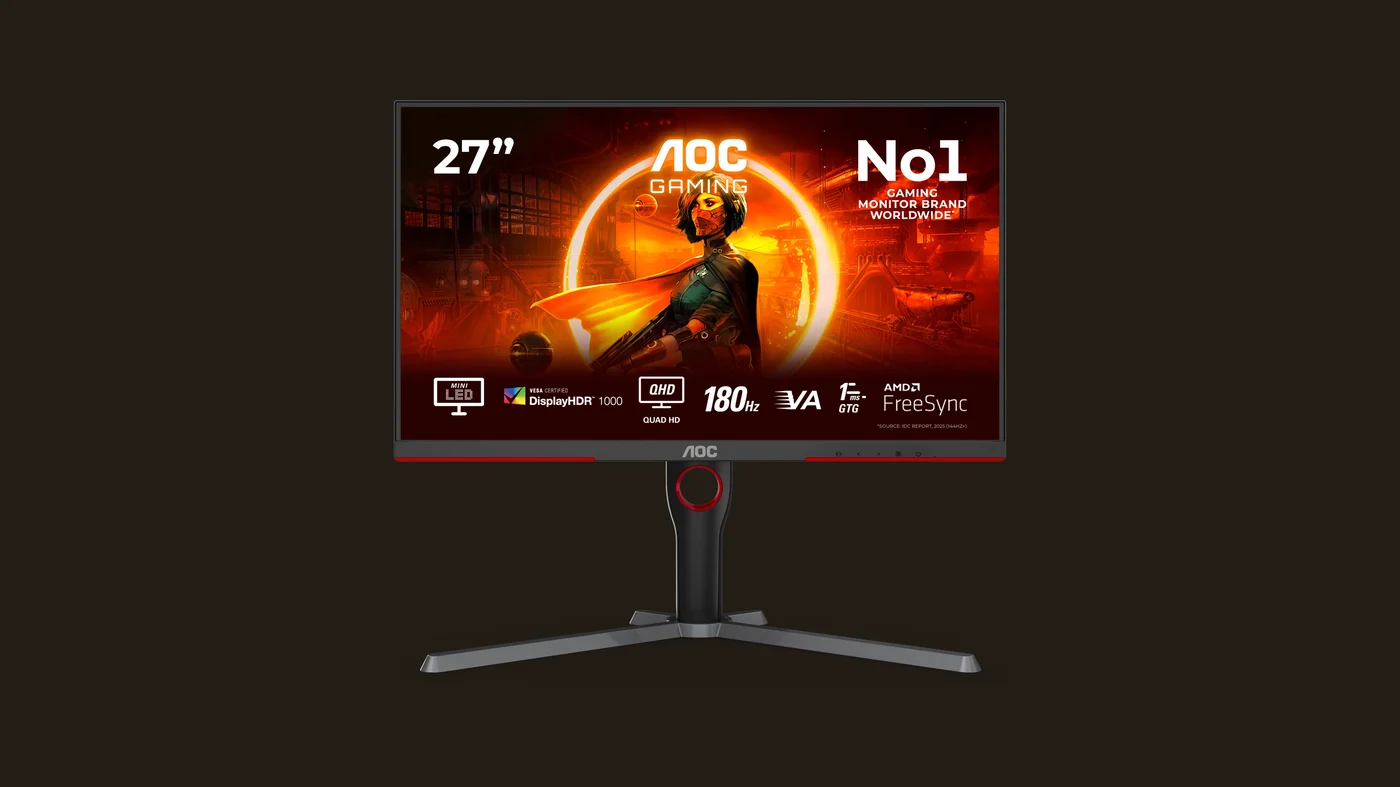
The best gaming monitor under $300 right now is the AOC Q27G3XMN, and it earns that spot for one specific reason: it puts a 336-zone Mini-LED backlight and full VESA DisplayHDR 1000 certification into a price bracket that has historically only offered basic edge-lit "HDR" badges with little real contrast behind them. Pair that with a 165Hz native refresh rate (180Hz overclocked), a 1ms GtG response time, and QHD resolution with 96% DCI-P3 color coverage, and you get a monitor that looks and performs like something from a much higher price tier. It isn't flawless — there's still some blooming in high-contrast scenes and at least one independent lab has flagged adaptive sync flicker — but for anyone who wants real HDR image quality on a budget, nothing else under $300 currently competes with it on that specific front.
The Essentials: Why 336 Mini-LED Zones Actually Matters
Search "best gaming monitor under 300" and, unlike most of VoxRig's other hardware reviews, you won't find RTINGS, PC Gamer, or Tom's Hardware sitting at the top of the results — this corner of the market is covered mostly by independent display-focused outlets. What's striking is how consistently those sources land on the same pick for the same reason: the AOC Q27G3XMN is one of the only monitors under $300 with a genuine Mini-LED full-array local dimming (FALD) backlight instead of the edge-lit or simple direct-lit setups that usually define this price range.
The number that matters here is 336 — that's how many independently controllable dimming zones sit behind the VA panel, backed by roughly 1,344 individual LEDs. To put that in context, a typical edge-lit "HDR" monitor in this price bracket has zero true local dimming zones — it just boosts overall backlight brightness and calls it HDR. A monitor with real zoned dimming can push the LEDs behind a bright object (a muzzle flash, a lit window, a UI element) to full brightness while keeping the LEDs behind a dark background dim or off entirely. The practical result in HDR games and movies is contrast that looks closer to what you'd see on a mid-range OLED TV than what you'd expect from a $260-280 monitor — deep blacks sitting right next to genuinely bright highlights, rather than the washed-out "fake HDR" look that cheaper edge-lit panels produce. That's also what earns it the VESA DisplayHDR 1000 certification, which requires real peak brightness and local dimming performance to pass, not just a marketing sticker.
On the speed side, 165Hz native (with a 180Hz overclock mode) and a 1ms GtG response time put it comfortably in competitive-gaming territory, and AMD FreeSync adaptive sync keeps frame pacing smooth as long as your GPU output fluctuates within its range. If you're assembling a full rig around a monitor like this, our budget PC setup guide covers a GPU pairing that can realistically push QHD at these refresh rates without bottlenecking the panel, and our best gaming keyboard under $100 review rounds out the rest of the desk.
What Independent Testing And Owners Report
Independent display-focused reviews of the Q27G3XMN, including DisplayNinja's in-depth testing, confirm the core claim: image quality and HDR brightness are genuinely excellent for the price, with the 336-zone backlight and quantum-dot-enhanced coating delivering both the contrast and the wide color gamut (96% DCI-P3, roughly 90% Adobe RGB) that the spec sheet promises. That combination of real local dimming plus wide color coverage is unusual enough at this price point that it's the single most repeated reason this monitor shows up as a top pick across independent coverage.
That same testing is honest about where the backlight falls short of a true high-end panel: blooming — a subtle halo of light bleeding around small, bright objects set against a dark background — is still visible, even with 336 zones working to contain it. It's meaningfully better controlled than what you'd see on a cheap edge-lit "HDR" monitor, but it hasn't been eliminated, and viewers who are sensitive to blooming in very high-contrast scenes (a spaceship's running lights against a black void, for example) will still notice it occasionally. Separately, RTINGS' lab testing has specifically flagged this monitor for adaptive sync (VRR) flicker during its variable refresh rate range — a real, measurable behavior worth knowing about if you're especially sensitive to flicker, even though it doesn't show up in every use case or for every viewer.
On the ergonomics side, verified owner feedback consistently mentions the monitor's stand as a pleasant surprise for the price — full height, tilt, and swivel adjustment rather than the tilt-only stands common on budget panels — along with a slim bezel design that makes it a reasonable candidate for a dual-monitor setup. If you're planning a full desk overhaul rather than just swapping the display, our gaming desk setup ideas guide covers monitor arm and lighting choices that pair well with a panel like this.
The Limitations
The two HDMI ports on the Q27G3XMN are HDMI 2.0, not 2.1. For PC use at QHD resolution this isn't a practical bottleneck — DisplayPort 1.4 comfortably handles 165-180Hz at 1440p — but it does mean console players hoping to pair this with a next-gen console at its highest refresh and HDR combinations will hit a ceiling that a true HDMI 2.1 port wouldn't impose. It's a reasonable tradeoff at this price, just worth knowing before you buy if console gaming is part of the plan.
The VA panel itself is also worth flagging honestly: viewing angles are narrower than what you'd get from an IPS panel, and colors or contrast can shift noticeably if you're viewing from an angle rather than dead-center. For a single-user gaming desk that's rarely an issue, but it's a real limitation if you're hoping to share the screen with someone sitting beside you.
Who It's For
This is the monitor to buy if HDR image quality and real contrast matter more to you than chasing the highest possible refresh-rate number — a 165-180Hz VA panel with genuine Mini-LED local dimming is a meaningfully different experience from a 240Hz+ panel with no real HDR backing it up, and at this price, you generally have to pick one priority or the other. It's also a strong pick if you want a monitor that can pull double duty for HDR movies and shows, not just games, since the local dimming performance benefits both equally. If flicker sensitivity or perfectly uniform, blooming-free contrast in every scene is non-negotiable for you, it's worth reading the independent lab testing on VRR behavior before buying — otherwise, for the price, nothing else currently matches what this backlight delivers.
Rounding out the rest of the desk: our best gaming mouse 2026 review covers the sensor side of a high-refresh setup like this one, and our best gaming headset under $100 review handles the audio half. If you're streaming from this setup rather than just gaming on it, our beginner streaming setup guide covers the webcam and lighting gear that pairs with a display this size.
Specs at a Glance
| Spec | Value |
|---|---|
| Panel type | 27" VA, QHD (2560x1440) |
| Backlight | Mini-LED, 336 local dimming zones |
| Refresh rate | 165Hz native (180Hz overclocked) |
| Response time | 1ms (GtG) |
| Brightness | 450 cd/m² SDR, up to 1,300 cd/m² HDR peak |
| Contrast | 4,000:1 static |
| HDR certification | VESA DisplayHDR 1000 |
| Color | 1.07 billion colors (8-bit + FRC), 96% DCI-P3 |
| Adaptive sync | AMD FreeSync |
| Connectivity | DisplayPort 1.4, 2x HDMI 2.0 |
Verdict
The AOC Q27G3XMN earns an 8.2/10. It isn't perfect — HDMI 2.0 rather than 2.1 limits its console ceiling, some blooming remains visible in high-contrast HDR scenes, and independent lab testing has flagged VRR flicker as a real consideration — but no other monitor under $300 currently pairs a genuine 336-zone Mini-LED backlight with real VESA DisplayHDR 1000 certification. If HDR image quality is your priority rather than just chasing the highest refresh number on the box, this is the smartest pick in the price range. Check the current listing on Amazon before deciding, since pricing on this model tends to fluctuate with promotions.
FAQ
Is the AOC Q27G3XMN actually HDR, or is it "fake HDR" like a lot of budget monitors?
Does the Mini-LED backlight eliminate blooming completely?
Is 165Hz or 180Hz the real refresh rate?
Can I use this monitor with a PS5 or Xbox Series X at its full refresh rate?
Is the VA panel a downside compared to an IPS monitor?
Pros
- 336-zone Mini-LED local dimming (FALD) delivers real, controlled HDR contrast — a backlight tier usually reserved for monitors well over $500
- VESA DisplayHDR 1000 certification backed by genuine full-array local dimming, not just a badge stapled onto an edge-lit panel
- 165Hz native refresh (180Hz overclocked) paired with 1ms GtG response time keeps motion sharp for both competitive and story-driven games
- QHD resolution with 96% DCI-P3 color coverage hits a sensible middle ground — sharp and colorful without needing a flagship GPU to drive it
Cons
- Both HDMI ports are HDMI 2.0, not 2.1 — a real limitation if you ever want to pair this with a next-gen console at its highest refresh/HDR combinations
- Local dimming still shows some blooming around small bright objects on dark backgrounds — 336 zones tame it far better than cheaper edge-lit monitors, but it isn't eliminated
- Independent lab testing (RTINGS) has flagged this monitor for adaptive sync (VRR) flicker, worth checking into if flicker sensitivity is a dealbreaker for you

Focuses on hardware and setup picks for VoxRig, built around manufacturer specs, verified buyer feedback, and independent professional testing from trusted outlets — cross-referenced before any recommendation goes live.