The Beginner Streaming Setup That Actually Gets You On Air Tonight
Four pieces of gear that cover the parts of streaming viewers actually notice — clear audio, a stable picture, decent light, and a way to switch scenes without breaking your commentary.

A beginner streaming setup doesn't need a green screen, a $400 studio mic on a boom arm, or a second monitor dedicated to chat. It needs four things that directly affect whether a stranger clicks away in the first ten seconds: audio they can actually understand, a picture that isn't a grainy laptop camera, light that doesn't make you look like you're broadcasting from a cave, and a way to switch scenes or mute yourself without fumbling through OBS mid-sentence. That's the whole list below — one webcam, one microphone, one light, one controller — and it lands around $250-300 total, not the $1,500+ "streamer starter kit" bundles that show up in most roundups.
The gear itself is free to run: OBS Studio, the open-source broadcasting software almost every streamer starts on, doesn't cost anything and works with all four picks out of the box. What you're actually paying for here is the hardware layer OBS can't fake.
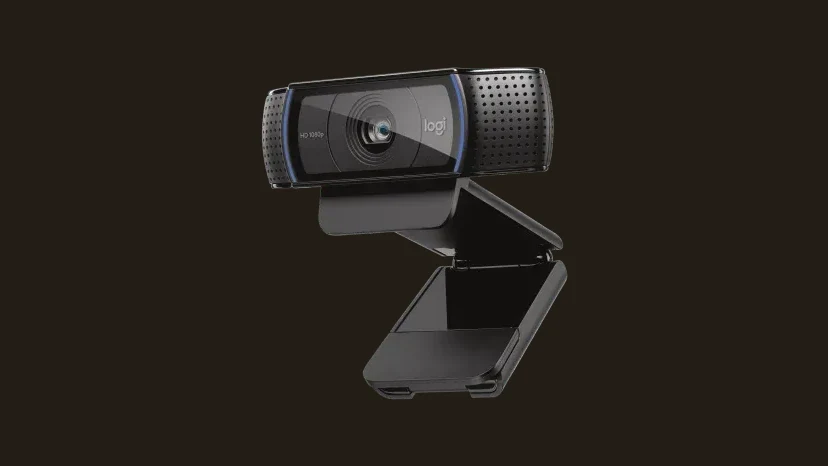
Logitech HD Pro Webcam C920 — the camera that just works
The C920 has been a default recommendation for over a decade for a simple reason: it does 1080p over USB with zero driver drama, and it's been tested against nearly every streaming and video-calling app that exists (OBS, Streamlabs, Zoom, Discord, Google Meet). It won't compete with a mirrorless camera rigged through a capture card, but that's not the comparison that matters for a first setup — the comparison that matters is "built-in laptop webcam" versus "dedicated 1080p sensor with proper autofocus," and the C920 wins that one comfortably.
It also has stereo mics built in, which matters for one specific reason: it means your first stream doesn't have to wait on a microphone purchase. You can plug in the Logitech C920, open OBS, and go live the same night — then upgrade audio next.
HyperX SoloCast — because audio is what actually keeps people watching
Every practical streaming guide agrees on one thing before all others: viewers tolerate mediocre video far more than they tolerate bad audio. A slightly soft webcam image reads as "budget setup." A crackly, echoey, or too-quiet mic reads as "not worth staying for," and people leave.
The HyperX SoloCast is a plug-and-play USB condenser mic with a cardioid pickup pattern, meaning it's designed to pick up your voice directly in front of it and reject a lot of the room noise around it — no audio interface, no phantom power, no mixer to learn on day one. It also has a tap-to-mute sensor on top, which solves the extremely common beginner problem of forgetting to mute before yelling at a game or answering the door.
If you already own a gaming headset with a boom mic, you don't strictly need this to start — our gaming headset roundup under $100 covers a few that stream acceptably. But a dedicated desk mic like the SoloCast sits closer to your mouth at a more consistent distance and isn't clamped to your ears, which is why most streaming-specific guides still recommend the upgrade once you're past your first few streams.

Elgato Key Light Mini — the single upgrade with the most visible payoff
Lighting is the most underrated line item in a beginner setup, and also the one with the fastest visible return. A webcam pointed at a dim room or backlit by a monitor produces a muddy, low-contrast image no matter how good the sensor is — the C920 included. Add one dedicated light source in front of your face, and the same webcam suddenly looks noticeably sharper and more "produced."
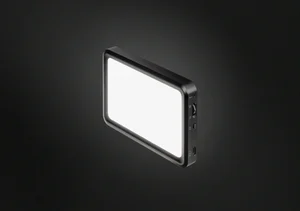
The Elgato Key Light Mini is built specifically for desk setups: it's battery-powered (roughly 4 hours per charge) so it doesn't need a wall outlet or a light stand taking up floor space, it clips on with a magnetic mount or screws onto a standard 1/4-inch thread, and its color temperature is adjustable from 2900K to 7000K through Elgato's app — useful since most desk setups mix daylight, RGB accents, and monitor glow, all of which clash under a fixed-temperature light. It's a step above the generic ring lights most "budget streaming kit" lists default to, which tend to create a visible ring-shaped reflection in your eyes and glasses.
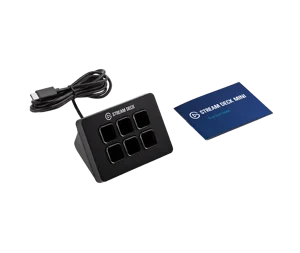
Elgato Stream Deck Mini — the one that saves you from fumbling live
This is the only item on this list that isn't strictly about how you look or sound — it's about not breaking the stream while you're running it. The Elgato Stream Deck Mini is a six-key USB-C controller with individually customizable LCD icons, and it integrates directly with OBS, Streamlabs, and XSplit. In practice that means one tap to switch from "gameplay" to "just chatting" scenes, one tap to mute your mic instantly (a second, hardware-level backup to the SoloCast's tap-to-mute), and one tap to start/stop a recording — instead of alt-tabbing to OBS and hunting for the right button while a hundred people watch you do it.
Six keys is plenty for a first setup: most new streamers only need scene switching, mic mute, and maybe a "starting soon" screen toggle. It's the kind of upgrade that doesn't show up on camera at all, but noticeably smooths out how a stream feels to run.
Comparison table
| Product | Category | What it solves |
|---|---|---|
| Logitech HD Pro Webcam C920 | Webcam | Replaces a laptop camera with real 1080p and reliable software compatibility |
| HyperX SoloCast | Microphone | Clear, consistent voice audio — the single biggest factor in viewer retention |
| Elgato Key Light Mini | Lighting | Fixes the "dim, flat picture" problem no webcam upgrade alone can solve |
| Elgato Stream Deck Mini | Scene controller | Lets you switch scenes and mute instantly without leaving your game |
If your PC itself is the bottleneck rather than your gear, our budget PC setup guide covers a build that can handle gaming and OBS encoding at the same time without the frame drops that ruin a first stream. And if the desk itself needs sorting out before any of this gear has somewhere to live, our gaming desk setup ideas cover monitor arms and cable management that make a webcam-and-light rig look intentional instead of clipped on wherever it fit.
Conclusion
A beginner streaming setup succeeds or fails on the same four things every time: can people hear you clearly, can they see you clearly, is the light doing you any favors, and can you run the show without visibly struggling with software mid-stream. The C920, SoloCast, Key Light Mini, and Stream Deck Mini each solve exactly one of those problems and nothing more — which is the point. There's no cinema camera, no XLR mixer, and no green screen here, because none of that moves the needle for someone streaming to their first ten viewers. Once you outgrow this setup, you'll know exactly which piece to upgrade first, because you'll have been using all four long enough to know where the real limit is.
If your keyboard and mouse are also due an upgrade once the streaming gear is sorted, our best gaming keyboard under $100 and best gaming mouse 2026 reviews cover two pieces that show up on camera as much as they affect how the game plays. And if the monitor you're streaming from is also the weak link, our best gaming monitor under $300 review covers a display with enough HDR range to look good on stream, not just in person.
FAQ
Do I need a capture card for this setup?
Is the Logitech C920 still worth buying, or has it been replaced by something better?
Can I skip the dedicated microphone and just use my gaming headset?
Do I really need the Stream Deck Mini to start streaming?
What software do I need to actually go live with this gear?

Focuses on hardware and setup picks for VoxRig, built around manufacturer specs, verified buyer feedback, and independent professional testing from trusted outlets — cross-referenced before any recommendation goes live.